

Audio Video Cable
What Is Audio Video Cable
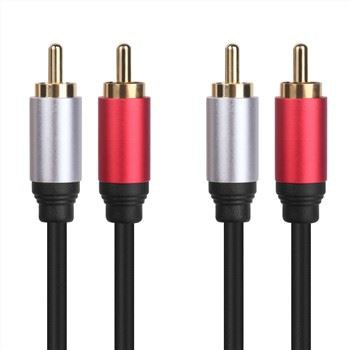
An audio video cable stands for Audio and Video cable. You can use it to connect different audiovisual equipment. audio video cables can be of various types, based on the number of sound channels, number of video channels, and control signals. audio video cables are used to connect display sources to output like TV. The display unit decodes the signal and transmits it within the audio video cable to reach the TV connector. audio video cables can carry both audio and sound cues and have separate connectors connected to the TV. Audio cables generally have two connectors for both ends for left and right channel sound. Without audio video cables, all our VCRs, DVDs, set-top boxes, and Blu-ray players will become useless.
Advantages of Audio Video Cable
High-quality audio and video transmission
Audio video cables are designed to transmit high-quality audio and video signals between devices, ensuring a clear and crisp audiovisual experience.
Compatibility
Audio video cables are widely compatible with a range of devices including tvs, monitors, speakers, gaming consoles, computers, and more, making them a versatile choice for audiovisual connections.
Ease of use
Most audio video cables are plug-and-play, requiring no special setup beyond connecting the cable between compatible devices, making them easy to use for both beginners and advanced users.
Versatility
Audio video cables come in various types such as hdmi, rca, displayport, vga, dvi, and optical cables, offering versatility in connecting different types of devices.


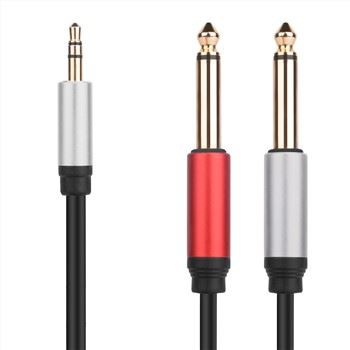
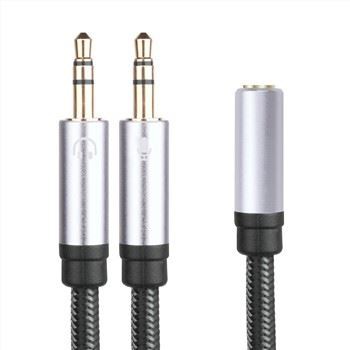
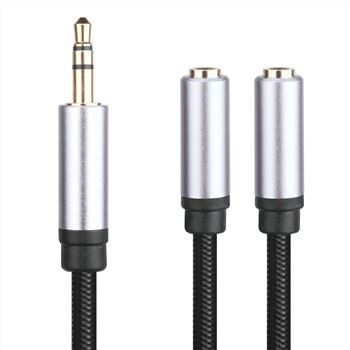
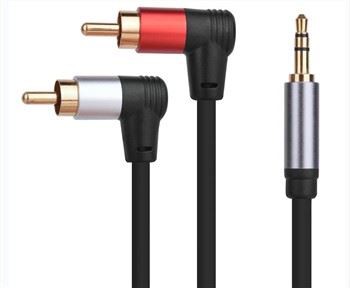



Tel: +86-756-8699660
Fax: +86-756-8699663
E-mail: sale-9@farreach-electronic.com
Add: No.6 Chuangye Road Est., Shuanglinpian Zone, United Harbour Industrial Area, Zhuhai, Guangdong, China
Why Choose Us
Customer settings
Besides our existing molded products, Farreach also can produce cable products according to the drawings or samples from our customers and offer free and professional design services.
Quality control
We control the product quality critically for every step during the manufacturing from raw meterial to finished products with 100% QC inspection and after sales services.All our products have 1 years warranty,you can rest assured for the quality.
Innovation
HIE was founded in 2009 and specializing in product development and brand operation of consumer electronics and that enhance the digital life of people all over the world. We believe that through innovative design, we can improve the way people interact with technology in their daily lives.
After-sale service
One of the greatest strengths of any product is the support that comes with it. We don’ t just stand by our products with industry-leading warranties, we stand by our customers, and treat each customer’ s question or concern as if it were our own. We support each customer with responsive, friendly, and helpful communication, seeing every question or concern as a valuable chance for us to improve.

Simply put, audio video cables carry the video and audio signals from one device to another. Most of you must have handled an audio video cable while fixing the cable tv box or hooking your game console or dvd to tv. It’ s basically a wire is one end having a single jack that goes into your console, dvd, or other display devices.
The other end has three jacks which can be yellow, red, and white. The yellow and red jack fit at the back of your tv or display, each providing the left and right channel sound. The white jack fits in the white hole and delivers video signals. You will have no confusing setting up an audio video cable as everything is color-coded for easy recognition. Audio cables are also part of audio video cables though they don’ t carry the video signals.
Audio video cables are standard, and most of them are rca, but now we have new and highly capable wires carrying a considerable amount of bandwidths which is the prerequisite of 4k or 8k tvs.
Audio Video Cable Types And Their Applications
Composite audio video cable (RCA Cable or F-pin Cable)
RCA finds applications in standard definition devices like gaming consoles, cable boxes, and DVD players. RCA is not suitable for HD signals, so they are less common nowadays. RCA connectors have a jack for left channel audio, another for right channel audio, and a video jack. Composite video is a version of analog TV signal before modulation into RF signal. Composite cables can face a loss of signal as it modulates the RF with the original audio signal and then demodulates it again for the TV. You can also encounter noise or interference because RF broadcasts all video and radio signals simultaneously.
S-Video audio video cable
S-Video uses the technology of breaking video information into two separate signals to broadcast in a single cable. One of the messages is used for chrominance whole the luminance provides the brightness. When the signals reach the VT, it creates crisper images than composite video as the signal is not transmitted over one wire. Your display source sending the signal must be compatible with S-video output. The TV or device returning the messages should have an S-video input jack. S-video cables can be used for over 200 feet with negligible signal loss. However, you won’ t generally get them with standard TVs.
Coaxial audio video cable
Coaxial cables are primarily used in the cable industry to transmit both audio and video between devices. The Coaxial cables are also known as RF cables and are used to connect the cable box or digital box to the TV. You can use the same cable to hook up VCRs, though the quality will not be excellent. For TVs with only coaxial RF inputs, you may need to use an RF modulator or video switcher.
VGA/DVI audio video cables
DVI is a digital interface standard that can transform analog signals into digital ones to support analog and digital monitors. The technology uses a single plug and connector, which supports legacy VGA and a digital-based plug connector. DVI can send signals from conventional sources to high-end HDTVs, DVD players, plasma displays, etc. You can get a pure digital picture experience as DVI is an authentic digital video connection. The digital-to-digital platforms offer optimum color saturation, leveraging the function of high-end DVD players and flat-panel LCD monitors. VGA cables can display both high and low resolutions in RGB formats.
HDMI audio video cables
HDMI is new gen of versatile connectors found on monitors, TV, and even smartphones. In a single cable, you are getting the advantage of Digital Video (DVI) AND Multi-Channel Audio. DVI cables need you to connect the audio wires separately as it only transfers audio signals. For this reason, DVI cables are not generally more than 16 feet as longer lengths translate to a loss of quality. The HDMI is the first standard to support both 720p and 1080p and standard video formats. HDMI also supports multi-sound audio and can run up to 40 feet without any loss of data transfer. HDMI also uses a remote control channel to send uncompressed digital and audio signals from a high-speed interface to display. The components can interact with each other over the single remote control channel to automatically play at the highest resolutions. As HDMI is backward-compatible, you don’ t need to change your DVI components. HDMI is capable of sending 5 Gbps, which is double the need for HDTV. HDMI can quickly send a high-quality signal over a long distance at high speed without loss of data. High definition, high-resolution video, and audio are enjoyed best at full settings, and HDMI enables you to exploit the advantages. As a result, you get accurate, clear, and sharp pictures that provide a more accurate representation of the content than analog signals or digital signals.
What Are the Best Practices for Managing and Organizing Your Audio Video Cable
Label your cables and wires
One of the simplest and most effective ways to manage and organize your audio video cables and wires is to label them. This can help you identify which cable or wire connects to which device, port, or outlet. You can use different methods to label your cables and wires, such as colored tape, stickers, markers, or tags. Make sure to label both ends of each cable or wire, and use consistent and clear labels that make sense to you.
Use cable ties or clips
Another way to manage and organize your audio video cables and wires is to use cable ties or clips to bundle them together. This can help you reduce clutter, avoid tangling, and prevent damage. You can use different types of cable ties or clips, such as plastic, metal, velcro, or magnetic ones. Make sure to use the right size and strength for your cables and wires, and don't tie or clip them too tightly or loosely.
Choose the right length and type of cable or wire
A common mistake that people make when setting up their audio and video systems is to use cables or wires that are too long or too short, or that are not compatible with their devices or ports. This can cause problems such as signal loss, interference, noise, or distortion. To avoid this, you should choose the right length and type of cable or wire for your audio and video devices. For example, you should use HDMI cables for high-definition video and audio, optical cables for digital audio, and coaxial cables for analog audio. You should also measure the distance between your devices and ports, and use cables or wires that are slightly longer than that, but not too long.
Hide or conceal your cables and wires
If you want to improve the aesthetics and safety of your audio and video systems, you should hide or conceal your cables and wires as much as possible. This can help you create a cleaner and more professional look, and prevent tripping or snagging hazards. You can use different methods to hide or conceal your cables and wires, such as cable trays, conduits, raceways, ducts, or covers. You can also use furniture, rugs, plants, or wall art to camouflage them.
Test and troubleshoot your cables and wires
Finally, you should test and troubleshoot your cables and wires regularly to ensure that they are working properly and delivering the best sound and video quality. You can use different tools and techniques to test and troubleshoot your cables and wires, such as multimeters, continuity testers, cable testers, or signal analyzers. You should also inspect your cables and wires for any signs of damage, wear, or corrosion, and replace them if necessary.
How Can You Ensure Proper Installation and Maintenance of VAudio Video Cable
Choose the cable that suits your needs
When selecting a audio video cable for your device, consider cable length, signal type (such as HDMI, VGA, or DisplayPort), and device compatibility. At the same time, high-quality cables produced by reputable manufacturers should be selected to ensure stable and reliable performance.
Route cables correctly
When installing audio video cables, avoid bending them excessively or wrapping them too tightly to avoid signal attenuation and interference. It is recommended to route the cables along a gentle curve and secure them with cable clamps or cable ties to prevent cable damage or strain. Also, care needs to be taken to avoid cable interference. audio video cables are susceptible to interference from other electronic devices, such as power cords, fluorescent lights, and wireless routers. Therefore, audio video cables should be kept as far away from these sources of electromagnetic interference as possible to reduce signal interruptions and maintain optimal performance.
It is also important to check the cable connections regularly
Regularly check that the audio video cable connections are secure and that they are not damaged or corroded. Loose or damaged connections can cause signal loss or reduced image quality. If necessary, clean the connector with a soft, dry cloth to remove dirt or debris. In order to detect potential problems in time, it is recommended to test the cable's performance regularly. Regular testing of audio video cables using a cable tester or diagnostic tool can help identify faults or inconsistencies in signal transmission, so corrective measures can be taken promptly.
Audio video cables should be stored properly when not in use
Place it in a cool, dry place, away from direct sunlight and extreme temperatures. Also, avoid bending or kinking the cable during storage to avoid damage to the internal conductors, which can affect performance.
Use caution when handling cables
When disconnecting or connecting audio video cables, avoid excessive pulling or force to avoid damaging the connectors or internal wiring. The connector should be held firmly and handled gently to avoid excessive stress on the cable.
Factors to Consider when Choosing Audio Video Cable
Device compatibility
Ensure that the audio video cable is compatible with your specific devices, such as TVs, gaming consoles, sound systems, or projectors.
Cable type
Understand the different types of audio video cables available, such as HDMI, DisplayPort, RCA, or optical cables, and their respective advantages and limitations.
Signal quality
Consider the signal quality requirements of your device and choose cables that can support the desired audio and video resolutions.
Cable length
Determine the required cable length based on the distance between your devices and ensure it is sufficient for your setup.
Cable construction
Look for cables with high-quality materials, robust connectors, and proper shielding to minimise signal loss and interference.
Brand reputation
Consider reputable brands known for their reliable audio video cables and positive customer reviews.
Our Factory
HIE was founded in 2009 and specializing in product development and brand operation of consumer electronics and that enhance the digital life of people all over the world. We believe that through innovative design, we can improve the way people interact with technology in their daily lives.

certificate


FAQ
As one of the most professional audio video cable manufacturers and suppliers in China, we're featured by good service and competitive price. Please rest assured to wholesale high quality audio video cable made in China here from our factory.
High end metal shell audio cable, DP TO DVI CABLE, DP TO VGA Adapter